%20(2).png)
7 min
SaaS Product Design Agency Pricing: What to Expect in 2026
What does SaaS product design agency pricing look like in 2026? Real US benchmarks for audits, redesigns and retainers, plus the costs quotes leave out.
Read More


Published
May 29, 2026
We have designed AI into a handful of products now, and the same split keeps showing up. Some AI features become part of a user's workflow within days. Others get tried once and quietly disappear.
The difference is rarely the model itself.
More often it comes down to two things. Does the feature solve a problem the user actually had, and do they feel confident enough to act on what it produces.
Across these projects, one pattern repeated. Getting AI to generate an answer was the easy part. Helping users understand, verify, and act on that answer was the hard part.
That is where AI product UX tends to succeed or fail.
One thing we have noticed across many products is that teams often decide they need AI before they have identified where it will actually help.
A chatbot gets added to the interface. An AI assistant lands on the roadmap. A generative feature ships because a competitor launched something similar.
The question that tends to come later is the important one. What problem is this solving?
Not every workflow benefits from AI. Not every task becomes easier through conversation. And not every user wants to chat with a system to do something they could have finished in a few clicks.
The most useful AI features usually start with a frustrating user problem, not a technology decision.
The goal is to reduce friction. AI is one way to do that, not the only one.
A lot of conversations about AI focus on capability. Can it summarize, can it generate, can it complete the workflow.
Those questions matter. From a UX perspective, another one usually matters more. Can users trust the output enough to act on it?
This became clear while designing an enterprise procurement workflow.
The original idea seemed straightforward. Users could describe what they needed, and the AI would generate a procurement request for them.
Technically, it worked. The AI produced requests quickly and accurately.
What surprised us was that users were not mainly struggling with filling out forms. They were struggling with uncertainty.
Many were creating procurement requests for the first time, unfamiliar with the terminology, approval rules, and supplier categories. Even when the AI generated a request, they could not tell whether it was correct.
The challenge was not generation. It was confidence.
Instead of trying to automate the whole process, we shifted toward helping users understand it.
The AI explained policies, clarified terms, and guided users through decisions at the moment they needed help. Every AI-generated field stayed editable, so users could review and adjust before submitting.
The AI sped up the workflow, but users stayed in control.
One assumption we see often is that AI should always automate work.
In practice, some of the most valuable AI experiences do not automate tasks at all. They reduce uncertainty, explain unfamiliar concepts, guide people through complex steps, and surface the right information at the right moment.
Assistance and automation are not the same thing. The more an interface explains and the less it quietly decides for people, the more they tend to rely on it.
Trust is one of the most fragile parts of any AI experience.
If users have a few poor interactions with an AI feature, they often stop using it altogether. Improving the model later does not automatically bring them back.
Research on human-AI trust points the same way. Trust repair tends to be asymmetric, where many good interactions build it and a single bad one can undo it.
This is why AI products need to think carefully about how they communicate uncertainty.
One challenge with AI systems is that they often present information with the same confidence whether they are certain or making an educated guess.
From a user's perspective, that is a problem. People need ways to understand:
Good AI product UX is not just about producing answers. It is about helping users decide how much confidence to place in those answers.
Another pattern we keep seeing is configuration overload. Many AI products expose:
The intention is flexibility. The result is often confusion.
Most users do not know which model to choose or which settings improve the outcome, and they want results, not a control panel: output that is useful, relevant, trustworthy, and fast.
Good AI product UX is not about exposing every possible control. It is about deciding which complexity users should never have to see.
One lesson that keeps repeating is that users do not want to learn a new way of working because AI exists. They want help inside the workflow they already understand, which is why contextual assistance often beats a separate AI experience.
In our procurement workflow, users benefited more from policy explanations and recommendations embedded directly in the request form than from a standalone chatbot.
The closer AI stays to the task users are already trying to complete, the more naturally it fits in.
The observations above point to a common theme. Users do not automatically trust AI just because it is intelligent. Trust is earned through the experience around the AI.
Here are a few principles we have found useful when designing AI-powered products.
One of the fastest ways to create anxiety is to make users feel the AI has taken over an important decision.
People are generally comfortable with AI making suggestions. They are far less comfortable when it makes irreversible decisions on their behalf.
Whenever possible:
This mattered in our procurement workflow. Users wanted AI assistance, but they also wanted to review and modify generated requests before submitting.
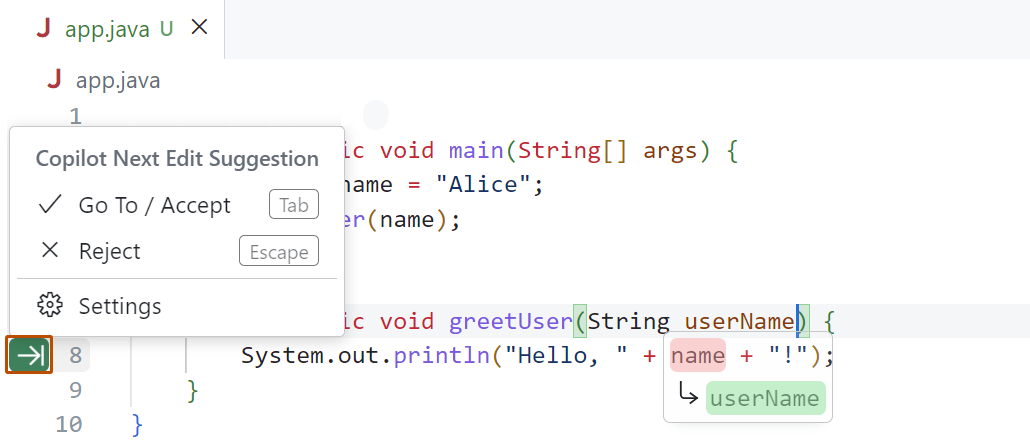
GitHub Copilot is a familiar example. It suggests code, but developers decide whether to accept, modify, or reject it. The AI speeds up the work without removing human judgment.
Trust increases when users can verify information. Instead of presenting answers as facts, provide:
It matters most where a wrong answer is expensive, like finance, healthcare, or legal work.
One caution we keep in mind, echoed in Nielsen Norman Group's research, is that visible citations can backfire. People sometimes trust an output because it looks well-sourced and never open the source, so provenance should invite checking rather than replace it.
On the procurement platform, this looked like the AI pointing to the specific policy behind a requirement, so a first-time requester could check it instead of taking it on faith.
Microsoft Copilot and Perplexity both do this well by attaching sources directly to responses, letting users validate information without leaving the workflow.
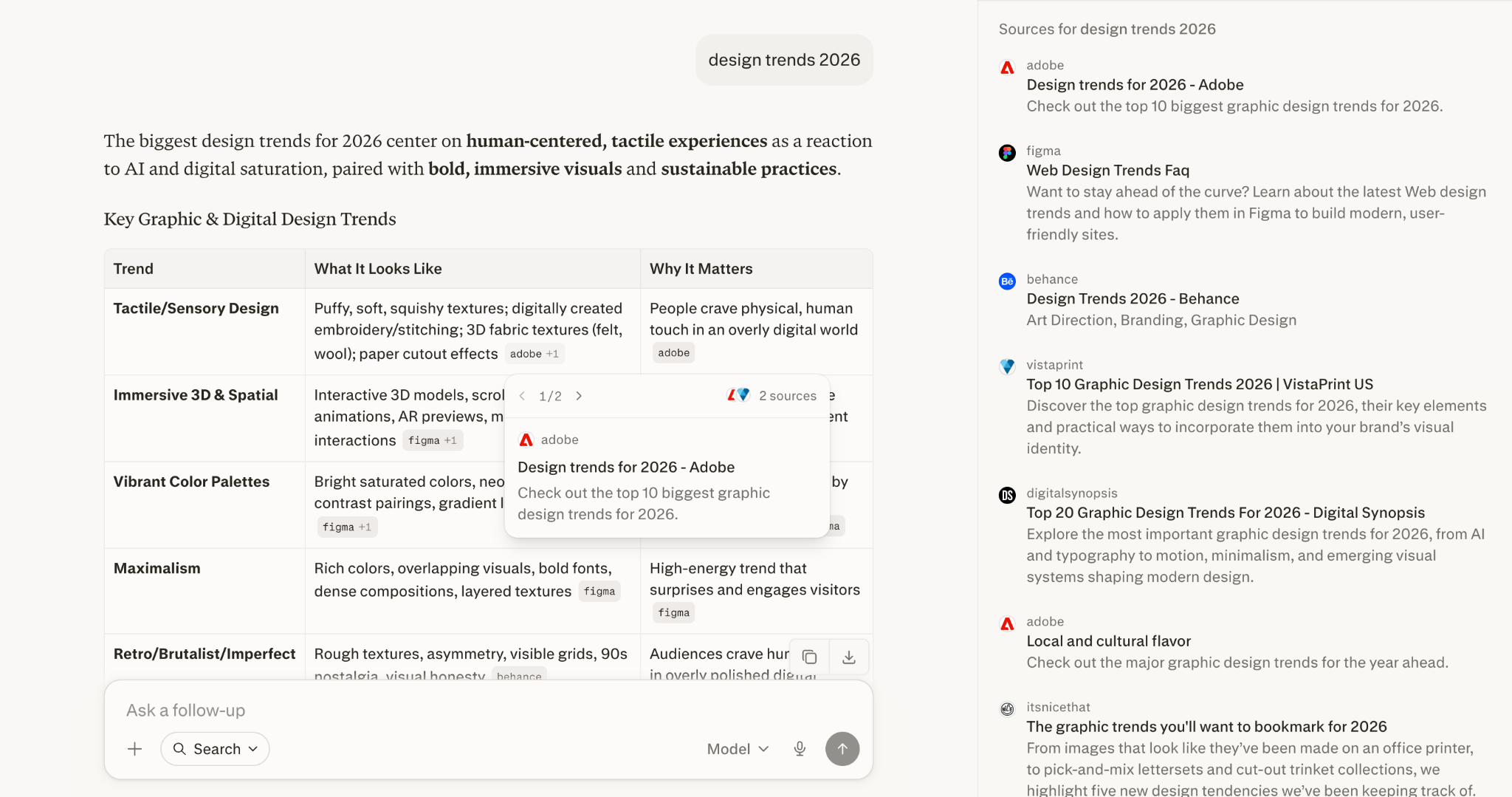
Many AI systems communicate with absolute confidence, even when the answer may be incomplete or wrong. Users often read confidence as accuracy.
That is why AI products should communicate uncertainty when it is there. For example:
Being transparent about limitations can feel risky, but it often increases trust, because users feel the system is being honest. A confident wrong answer damages trust far more than an honest acknowledgment of uncertainty.
With first-time requesters on the procurement project, framing a generated value as a suggestion to confirm, rather than a settled fact, matched how unsure they actually were.
Many teams focus on replacing user effort. Sometimes the bigger opportunity is helping users make better decisions.
Think about workflows where people are unfamiliar with terminology, policies, regulations, or processes. In those situations, AI can:
This is what we saw in procurement. The AI earned its place by explaining approval paths and clarifying requirements, not by completing the request unattended.
The result was a more trusted and more useful experience.
Users are more likely to trust a recommendation when they understand why it was made.
Instead of saying "Recommended supplier selected," explain the reasoning. "Recommended because this supplier has the highest performance rating, the lowest delivery delays, and meets your budget."
Even a simple explanation can sharply improve confidence. On the procurement platform, the vendor recommendation worked because it carried that reasoning with it, not just the suggestion.
People do not always need to understand the underlying model. They do need to understand the reasoning behind important outcomes.
A common mistake in AI products is exposing too many options in the name of flexibility. Users are often presented with:
Most users do not want to become AI experts. They want to finish a task.
Good AI product UX hides unnecessary complexity and makes sensible decisions by default. In the procurement work, that meant never asking a requester to think about how the AI worked, only whether the request in front of them looked right.
The best AI experiences feel simple because someone decided what users should never have to configure.
Grammarly is a useful example. Users focus on improving their writing rather than tuning language models or AI parameters.
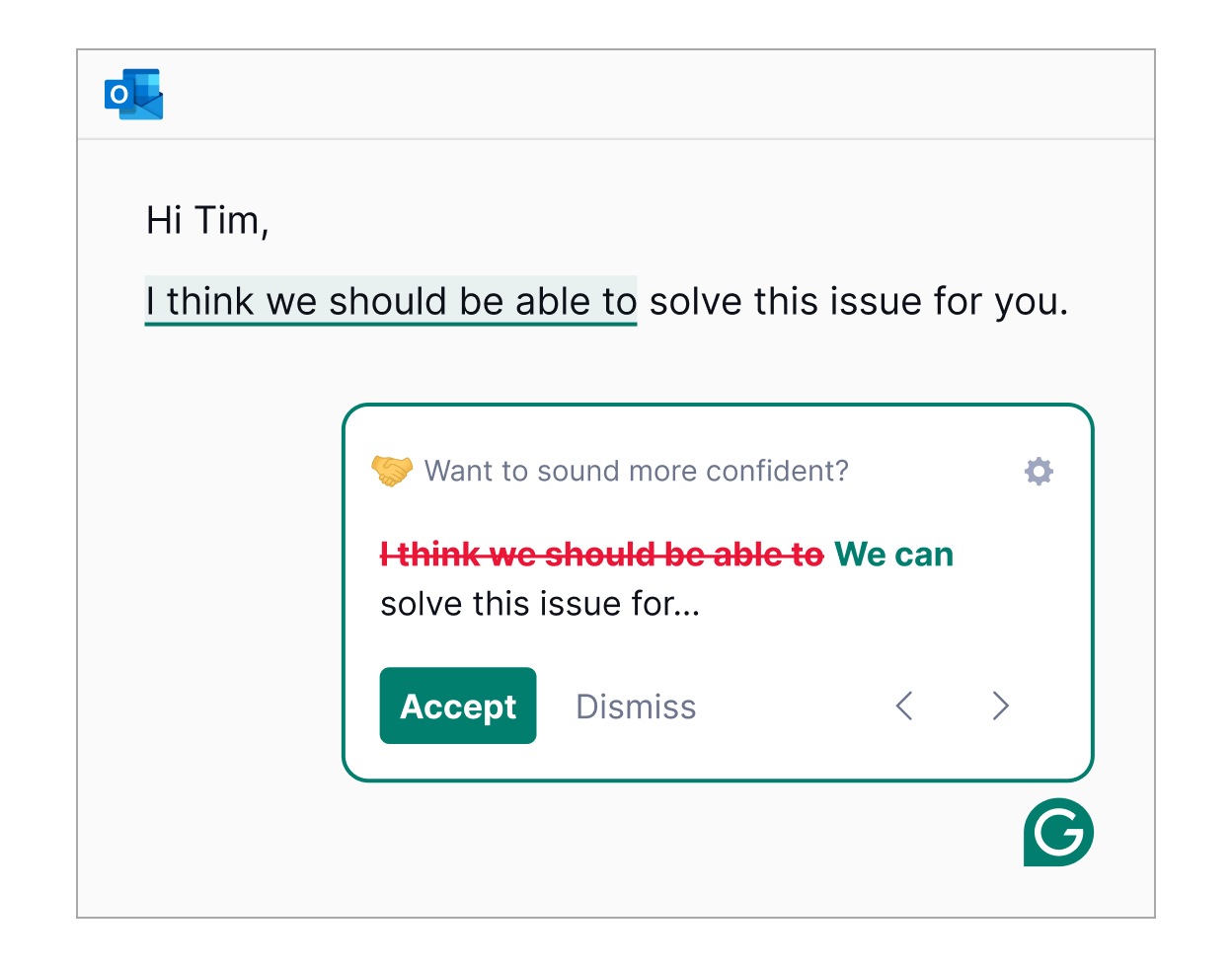
Many AI features struggle because they ask users to leave their current workflow and talk to a separate assistant.
The most successful AI experiences often feel close to invisible. Instead of creating another destination, they bring AI into the task users are already doing. Examples include:
Google's Smart Compose is a good example. Users do not stop writing to interact with AI. The assistance appears naturally as they type.
The less context switching a feature requires, the more likely people are to adopt it.
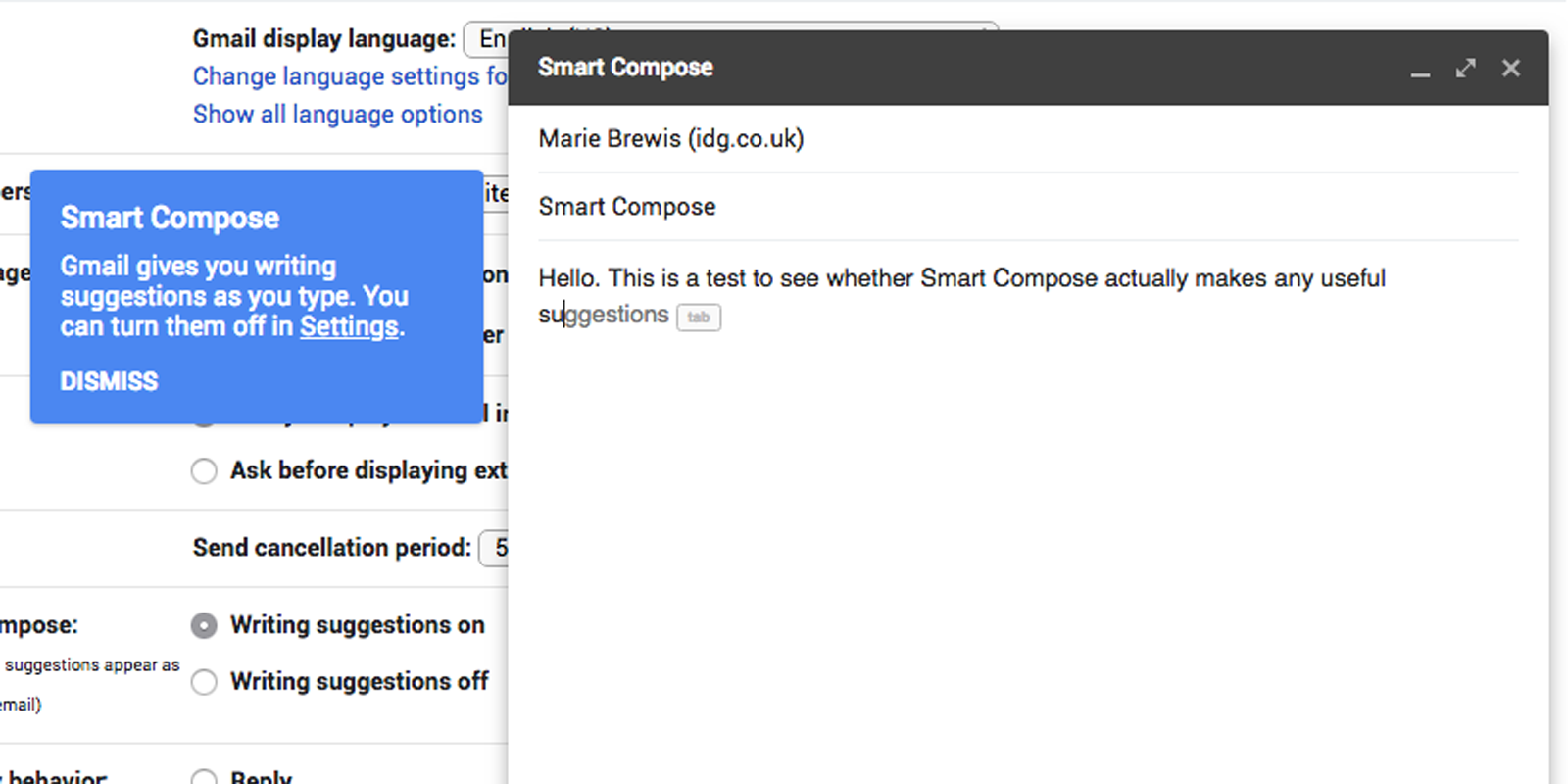
The most useful lesson we have taken from this work is that AI succeeds when it reduces uncertainty. It does not earn adoption by taking full control, piling on complexity, or making people adapt to the technology.
People still want confidence, context, and control. The AI product UX that earns adoption tends to help users make better decisions while leaving those three things intact.
Most AI products that struggle are not held back by a weak model. They struggle because the experience around the model was not designed with the same care.
If an AI feature you have shipped is not getting used the way the demo promised, that is usually a design problem worth a close look. We help funded SaaS and AI startups turn AI features into experiences people trust, so take a look at how we approach AI product design and we can pressure-test the experience with you.